Free browser extension

Prompts TOC & Search for ChatGPT

Find your way through long ChatGPT conversations.

The extension automatically creates a table of contents (TOC) from your prompts, so you can jump to earlier messages and search the full conversation.

No account. No subscription. No mailing list.

See it in action

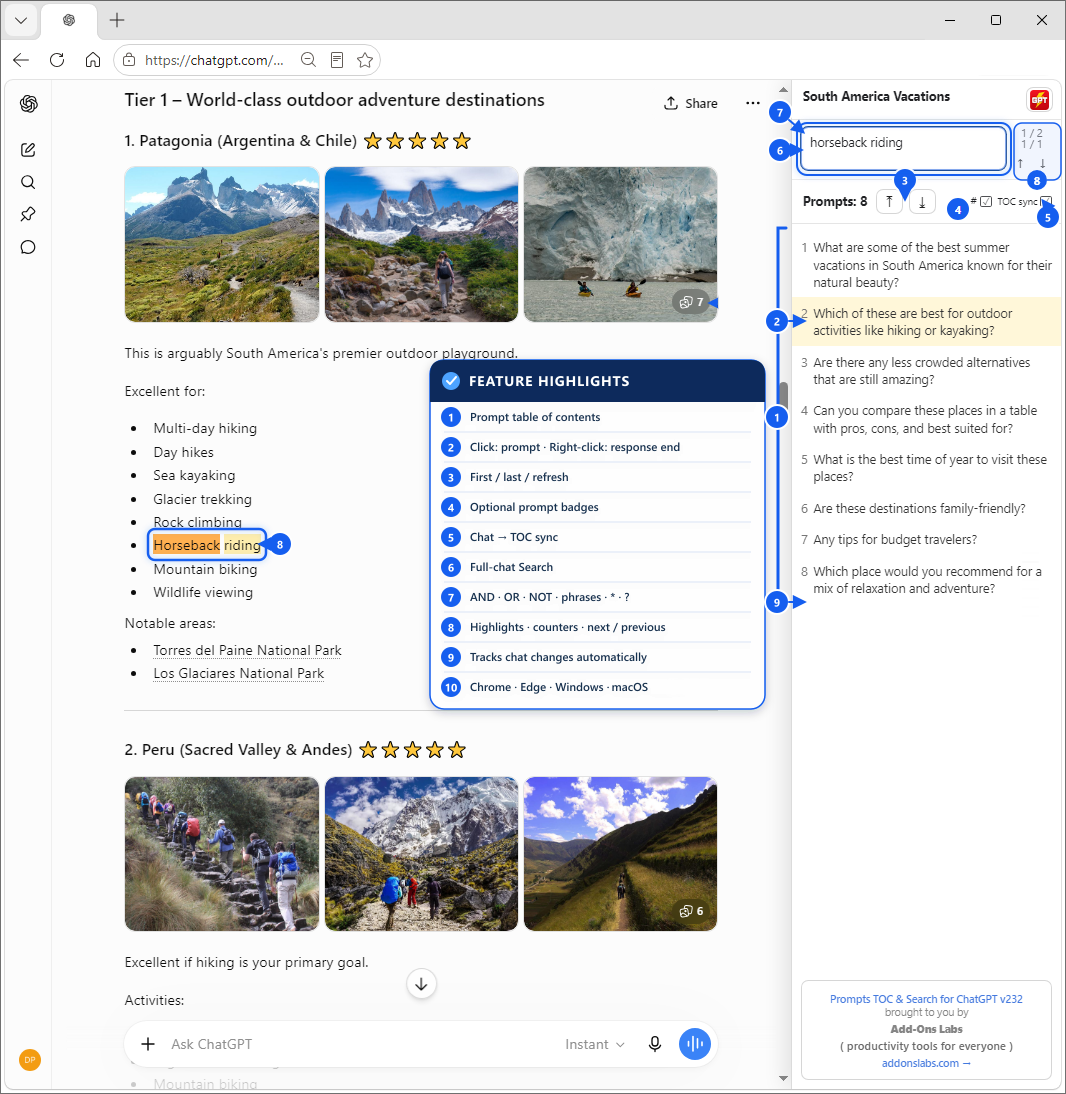
See your ChatGPT table of contents in action.

Your prompts stay organized in a simple panel, ready whenever you need to return to an earlier question or find a detail.

ChatGPT conversation with the Prompts TOC & Search panel showing a searchable list of prompts
Prompts become a useful table of contents for the conversation.

Feature highlights

  1. Right-side table of contents for every prompt in the active chat branch.
  2. Left-click a prompt to jump to it; right-click to jump to the end of its response.
  3. First/last prompt navigation and manual prompt-list refresh.
  4. Optional numbered prompt badges inside the conversation.
  5. One-way chat-to-TOC synchronization with a current-prompt marker.
  6. Full-chat search across prompts, responses, tables, and quoted text.
  7. Logical search with AND, OR, NOT, exact phrases, *, and ?.
  8. Search highlighting, match counters, next/previous navigation, and keyboard shortcuts.
  9. Automatic tracking of new, edited, deleted, branched, attachment-only, and virtualized prompts.
  10. Works with Chrome and Edge on Windows and macOS.

Made for everyday ChatGPT users

Spend less time scrolling.
Jump straight to the part you need.

01

Navigate by prompt

See your questions in one clear list and jump directly to any one.

02

Search the conversation

Find earlier information without rereading every answer.

03

Stay oriented

Keep your place even when a conversation grows long and detailed.

04

Use ChatGPT as usual

No technical knowledge or new workflow is required.

Frequently asked questions (FAQ)

Does the extension automatically create a table of contents for ChatGPT?

Yes. It automatically organizes the prompts in your active ChatGPT conversation into a clickable table of contents. Select a prompt to jump directly to it.

Can I search the entire ChatGPT conversation, not just the prompt list?

Yes. Full-chat search covers both your prompts and ChatGPT’s responses, including code blocks, tables, and quoted text.

Simple. Private. Useful.

Helpful without the extra baggage.

Prompts TOC & Search is designed to improve your ChatGPT experience without adding unnecessary complexity.

  • No Add-Ons Labs account
  • No subscription
  • No mailing list
Read our privacy policy

Prompts TOC & Search for ChatGPT

A clearer way through every conversation.

Get Prompts TOC & Search for your preferred browser.